 24/7 Technical Support
 Deals & Coupons
 My Account

There is no doubt that everyone knows how to use Google, but most users are not aware of how it works. To understand what SEO is and how to use it, it is worth first understanding what happens when you perform a search: contrary to popular belief, a search engine does not actually search "the entire Internet". Google, for example, crawls the Internet at times convenient to it, regardless of the search queries typed into it (77,000 searches every second, to be precise). Each time it crawls more and more web pages and adds them to an archive called "the index".
When I, as a user, search on Google, I am actually searching within the index that Google has prepared in advance. Google organizes the results in the index according to the search, and displays the most relevant results based on hundreds of different parameters – Is the phrase in the title? In the content? Is the site of high enough quality? Do other sites link to it as an authoritative source? And so on. Website promotion is based on dozens of actions, if not more – both on the site itself and on other sites. Google's search algorithm is based on hundreds of different parameters: site content, loading speed, user experience, how popular the site is, and so on.
Google weighs all these hundreds of parameters according to the algorithm's formula, which nobody knows. This formula ranks the various sites in the index and displays them in descending order – from the best downward, according to the search typed. Although Google's formula is secret, years of practical experience have led to several conclusions that narrow the hundreds of parameters down to four main stages:
In the following guide – we will explain each of the stages.
Stage 1
Do keyword research: what are people searching for?
If we don't know what people are searching for, we can't adapt the site to those searches. For example – if Danny is looking for Nike shoes, how will he search? Will he type "shoes"? Or perhaps "Nike shoes"? Or perhaps "nike shoes"? There may be several options, and we need to know them.
For this purpose there are keyword research tools that show how many searches each phrase gets. For example, the phrase "shoes" has 18,100 searches on Google every month. The phrase "Nike shoes" has 22,200 searches a month… and so on. Once we have made a list of all the relevant words for the site, we can match each word or set of phrases to existing or new pages.
Meet some of the main keyword research tools:
Google autocomplete and related searches.
Paid tools such as Ahrefs, Semrush and more.
For example, to do keyword research with Google's tool (which is currently the most accurate) – go here and sign in with a Gmail account
For the tool to work optimally, it is preferable to advertise actively on Google. If you don't advertise on Google, you will only get a data range for search volume (rather than an exact number). Even so, a data range is better than nothing.
To start your research, click the box "Discover new keywords". Once the box opens, you can type up to 10 phrases into the field (or alternatively paste a website URL in the second tab and get phrases relevant to it).
After typing the phrases, make sure the language and country are correct (Hebrew + Israel in our case. If you are promoting abroad", choose the relevant language and country accordingly). Then click at the bottom on "Get results":
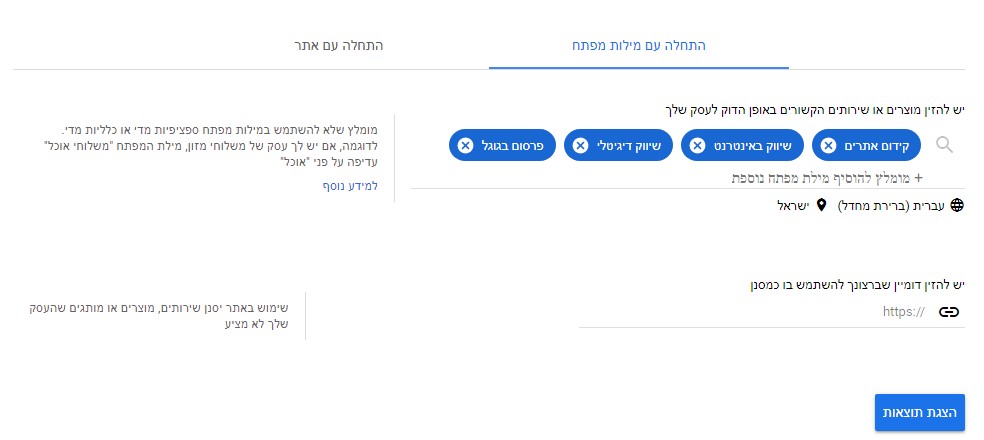
Next, the phrases you selected will be shown at the top – and additional relevant phrases will be shown at the bottom. These additional phrases can broaden the scope and help you find more topics and ideas for promotion on the site.
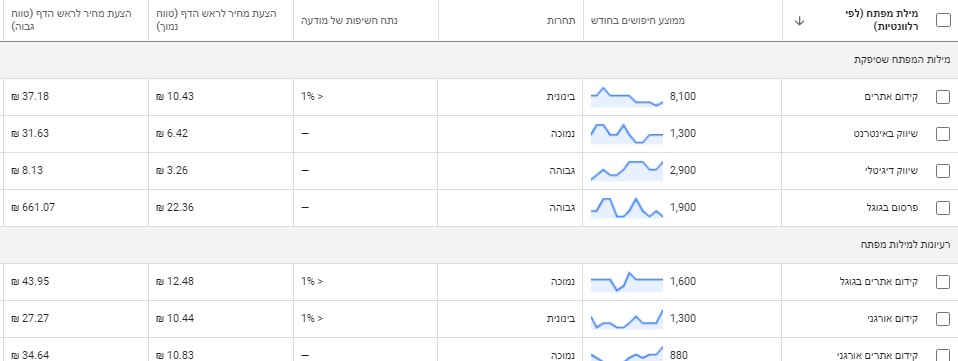
Next to each phrase there is a column called "Avg. monthly searches" – which is the most relevant column for organic promotion. For the purpose of this explanation, you can ignore the other columns such as competition, bids and so on.
In our case, Google's tool shows 271 phrases based on the 4 phrases we selected. This way you can keep checking more and more phrases, download the data to a file and do comprehensive keyword research on almost any topic.
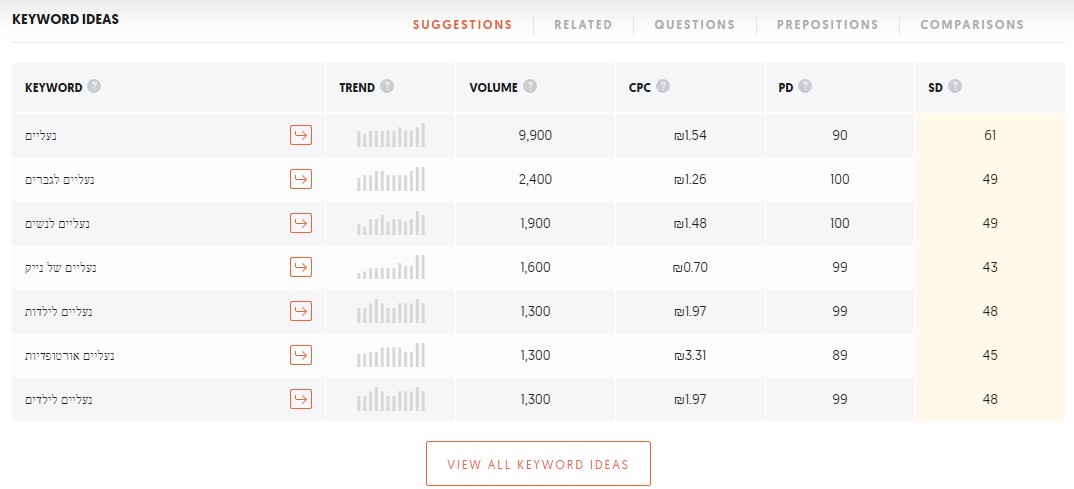
Another option is to use Ubersuggest. First we select the relevant language and country (Hebrew / Israel in our case) – and then type a phrase (shoes) and click Search.

We then reach a new screen where the tool shows us data about the phrase at the top, as well as data about additional relevant phrases further down. As with Google's tool, here too the most important figure is search volume – and everything else is somewhat less relevant.
For example, the SEO Difficulty figure is used to indicate how hard it is to rank for the phrase. The closer the score is to 100, the higher the difficulty. Sounds nice, but in reality this figure is not related to actual search engine ranking; it is something generated by the tool alone. You can certainly use this figure, but don't trust it blindly or make decisions based on it alone.

Another option for finding keywords to promote is using Google's autocomplete:
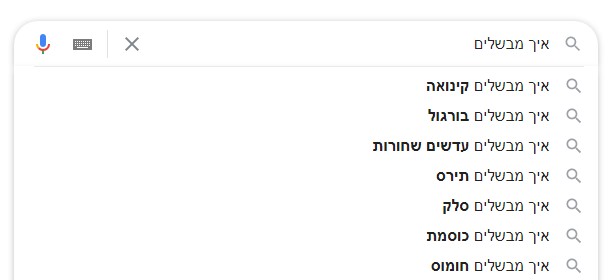
as well as using the related searches at the bottom of Google's results:
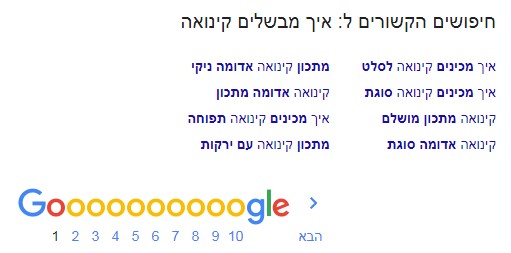
At this stage (and in fact throughout the process) it is possible and recommended to also do competitor research. Instead of trying to reinvent the wheel and racking your brain over "what it takes to rank on Google" – simply take a peek at your competitors. This doesn't mean copying everything your competitors did one-to-one; rather, take a sober look at what they have that we don't, and consider whether to implement it as well.
An example of short, effective competitor research – Search Google for several phrases related to them, check who is in the top ten and what they did to get there: what type of content is on the ranking page (text, images, videos, products), what the page has that yours doesn't, what links they obtained (see Stage 3), and so on. Organize all the information in a table you prepared in advance, so you can extract all the information at a glance.
By the way, if you'd like to save yourself the trouble – an Israeli company called ZEFO provides an excellent SEO platform that, among other things, also performs automatic competitor research.
Stage 2
Adapt the site to search engine requirements
After we have found all the relevant words (for the shoe niche, for example) – we begin making adjustments to the site ("optimization", in professional terms; part of the term SEO, as we already know).
For example, the phrase "shoes" is very general, so we will place it on the home page. In contrast, the phrase "Nike shoes" is a more focused phrase – and we will place it in the appropriate category, which displays only that brand's shoes. The same applies to the other phrases we found – women's shoes, men's shoes, children's shoes and so on.
How do you place the phrase on the page that matches it? In the main title (Title) and the meta description (Meta Description), the elements Google displays in the results; and then also in the other parts of the page – main headings and subheadings (H1, H2, etc.), text content, Alt Text tags on images and so on.
What about phrases for which there are no pages on the site yet? Create new pages, according to the optimization rules mentioned earlier. It is recommended to enrich the site with new content relevant to the target audience daily / weekly / monthly (at least once a month is recommended). Every new page can be another entry point to the site.
Ideas for new content can be taken both from the keyword research we did and from your knowledge of your field as the site owners. For example, you can collect all the questions that come from existing or potential customers, and turn each question and answer into an article on the topic.
Along the way, it is also important to ensure a few more things:
Site loading as fast as possible (3 seconds or less)
Site speed is an official ranking factor in Google's algorithm, and it must not be overlooked. To check your site's speed you can use several tools, such as Google's tool
All these tools check only the specific page you entered, not the entire site. To understand the loading speed of the entire site – it is recommended to use Google Analytics if it is installed on your site).
Since improving speed is a separate topic in its own right, and also a very technical one – it is recommended to read how to do it in other sources. For example – Shay Toder's website:
Full adaptation to all screen types
Today most browsing and Internet use is done via smartphone or tablet, not just on desktop computers or laptops. Beyond that, a significant part of our digital activity is also moving to TV screens (for example, playing YouTube videos and so on).
Since we use so many types of screens, the site must fit all of them. This point is especially important on smartphones, which account for most browsing traffic today. Google ranks sites first and foremost by their mobile version, since it is the most important.
Most sites today are responsive – meaning they adapt to the screen size. Even so, it is highly recommended to verify for yourself that the site is suited to browsing on multiple devices. Visit the site on a computer, a smartphone and so on, to make sure everything looks good and that you can perform all the usual actions that can be done on desktop (scrolling, using navigation menus, searching and so on).
A secure and stable site
Information security has become a significant topic in recent years, especially on business and e-commerce sites that are obligated to protect user data. Google also dedicates resources to this, and flags in the Chrome browser any site that is not secure (Not Secure, as you can see in the screenshot).

Accessibility for people with disabilities
The more we adapt the site to more users, including people with disabilities such as the hearing and visually impaired, the more satisfaction metrics will improve (which also indirectly affect ranking on Google). It is important to remember that certain sites are required by Israeli law to be accessible.
Tip: Are you required to make your site accessible?
Use the accessibility questionnaire we built for you on our site, and you can check for yourself.
Stage 3
Improve the site's popularity ranking
Alongside the set of actions we perform on the site, a separate set of actions must also be performed on other sites. Why? Because if I have a business, but the only evidence of its existence is my website – nobody will know I exist.
For Google and users to know this is a real business, other sites also need to point to its existence. This is usually done by building links and mentions of the business / brand name. Here are a few examples.
Opening a business listing in the major directories
Google also uses the major directories as a reliable source for identifying businesses, so you must create a business listing in each of them: Dapei Zahav, 144, Easy and so on. You must also create a Google Business Profile for your business, in order to gain exposure and inquiries from customers via Google Maps as well.
Important note: the business name, phone and address (NAP = Name, Address, Phone) must be identical across all these assets – in directories, on your website and in Google Business Profile. This is how Google will recognize you.
Use Facebook, Instagram, LinkedIn and whatever is relevant to your business. Don't open a profile on all of them and then neglect them. If you intend to set up a profile, make sure it also gets ongoing maintenance in the form of posts, photos, responding to users and so on. Your social media profiles will also be used to distribute your content, such as articles you have written on your site or on other sites.
Articles and links on external websites
Write and publish articles in your field, also on other websites in similar and related fields. For example, a site selling shoes can publish an article on a general fashion site; a digital marketing site can publish on a blog about advertising, and so on. From each such article, include a link to your website, usually preferably using the business name and/or a phrase describing your field of activity.
How do you do this in practice? Here are a few examples:
Buying paid articles – You can get articles published on major sites such as Calcalist, Israel Hayom, Behadrei Haredim and so on. You can also buy articles and links from digital professionals who own a large number of websites for this purpose.
Link exchanges – Instead of paying for articles and links, you can ask for a link in exchange for a link: "I'll give you a link on topic X and you'll give me a link on topic Y". Look for Facebook groups under the name "Link exchanges" and you can take it from there.
Competitor link research
It is recommended to check which links our competitors in Google's top 10 and top 20 have obtained. This can be done with paid tools such as Ahrefs, Semrush and others, or with a limited free tool called Ubersuggest (mentioned earlier).
 Talk to Us
Chat with us on WhatsApp
For orders and sales we are available on WhatsApp, Sunday–Thursday, 9:00 AM to 6:00 PM (Israel time). On Fridays, Saturdays and holidays, please use the support center on our website. Phone: +972-79-5599455