 24/7 Technical Support
 Deals & Coupons
 My Account
- SSL is an encryption and security method for secure web pages. Secure pages are pages whose communication with the browser is encrypted, and whose identity, or the person presenting the pages, can be verified.
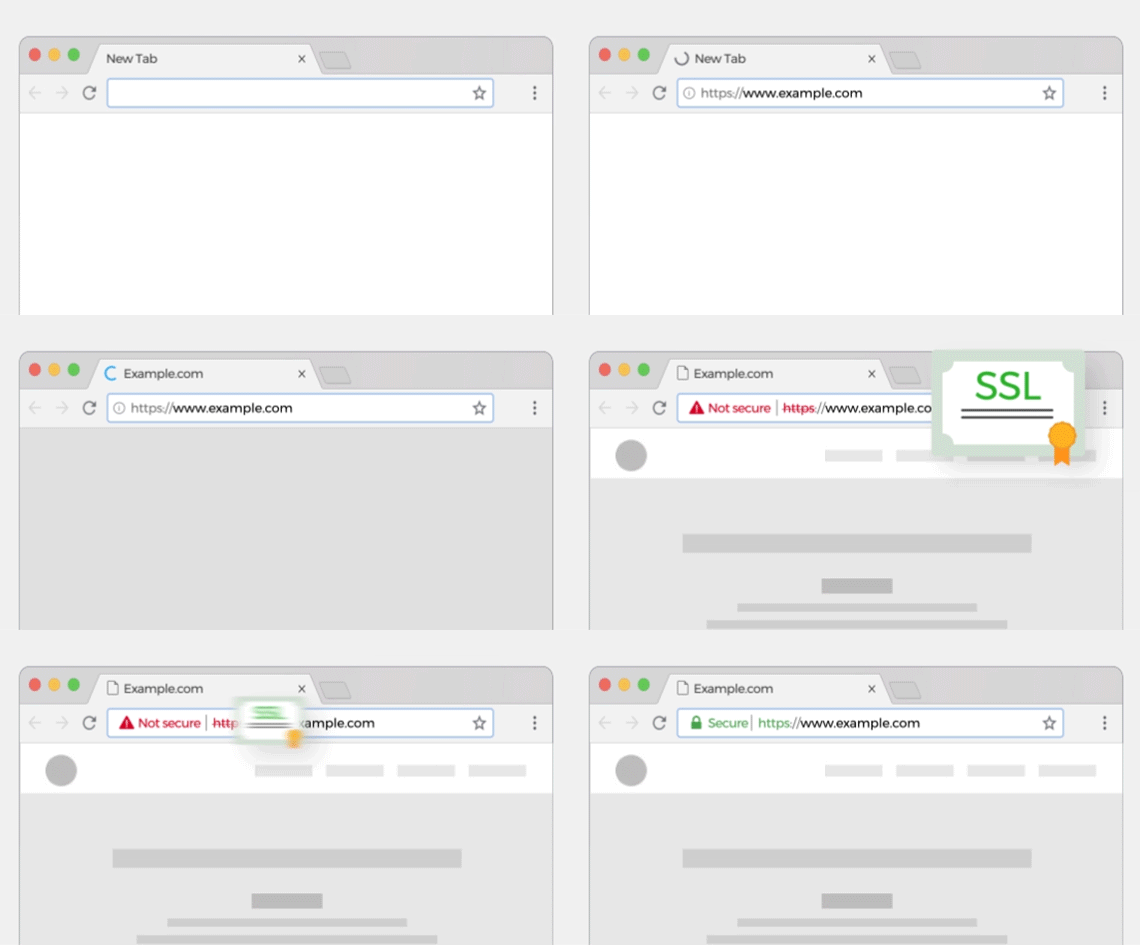
- When a visitor reaches a secure page, a padlock icon appears at the bottom or top of the browser, and sometimes a locking sound is even heard.
- These indicate to the visitor that the page is secure. Double-clicking the padlock icon while visiting a secure page will show the visitor the identity of the owner of the secure pages.
- When clicking the padlock, it is recommended to check the name of the company responsible for the encryption and make sure it is indeed a real company.
- The company that issues the SSL key, which enables secure pages to be displayed, is responsible for the accuracy of the information shown on the website.
- Internet users place greater trust in secure pages. When working with a secure page, you can, for example, submit a credit card number without fearing that someone eavesdropping on the communication along the long path between the visitor's computer and the website will be able to capture the number and use it. In addition, a visitor to a secure page knows that they can contact the website owners: their address and phone numbers are registered and their authenticity has been verified by the company that issued the SSL key.
- Credit card companies require that order forms through which credit card numbers are submitted be secured with SSL technology.
- Another development is the EV (Extended Validation) SSL certificate, which includes a mechanism for detecting fake websites (the "phishing" phenomenon), protecting you and preventing you from falling victim to scams and impostor websites. Instead of clicking the padlock icon, more and more websites offer the option of the browser coloring automatically: an impostor website will be colored red - on such a website you should avoid browsing and submitting private information such as bank account numbers, identifying details, etc.
- On the other hand, green indicates a trustworthy website - on this website you can browse safely and without worry.
- The slide shows a website pretending to be a bank website, but which is actually an impostor website. INTERNET EXPLORER 7 immediately displays the danger.
- The system checks whether the code written on the website matches its description and whether the website is an impostor; if so, a warning is displayed.
- The SSL encryption infrastructure was established as a solution for transferring confidential information over the internet. The idea is that every transfer of information from your computer and back to it is encrypted, so that eavesdropping does not expose the information being transferred. The SSL infrastructure is based on a digital Certificate issued, for example, by an approved body: double-clicking the padlock icon will display the certificate. If the certificate is not valid (for example, a mismatch between the website name and the name registered in the certificate), a window with a warning will appear. In this case, extra caution should be exercised before proceeding, as some party may be impersonating another website / organization with a website of its own)
- In addition, the SSL infrastructure is based on a principle whereby no local information related to the encrypted communication (for example, the credit card number) is stored on the computer, thus providing good protection for sensitive information.
- It is important to note that only the presence of the padlock icon at the bottom/top of the browser indicates encryption. It is important not to settle for a statement that the website is secure, but to verify this by double-clicking the padlock icon.
Types of security:
- The longer the encryption key (the SSL key, which enables secure pages to be displayed; this key is issued by an issuing company), the stronger the encryption and the better protected the information. Today, the most common keys on the market are 256bit-128bit and 40 bit in length.
- The preference, of course, is for 256 bit. Today, the vast majority of browsers are able to display a page encrypted with a key of this length.
 Talk to Us
Chat with us on WhatsApp
For orders and sales we are available on WhatsApp, Sunday–Thursday, 9:00 AM to 6:00 PM (Israel time). On Fridays, Saturdays and holidays, please use the support center on our website. Phone: +972-79-5599455
© 2001 - 2026 DNS CLOUD. All rights reserved.